Videos to blog posts, automated.
A free plugin that publishes a complete blog post every time you upload a new video — with the real video transcript turned into an SEO-friendly AI summary. No copying. No pasting. No manual writing.
Where to get the plugin
Video To AI Blog Post is distributed through the official WordPress.org Plugin Directory. One-click install from your WP admin or download the zip below.
From upload to published — in minutes.
Four steps. Fully automatic. You hit "publish" on YouTube; the plugin handles the rest on your WordPress site.
Watch the feed
The plugin polls your YouTube channel's public RSS feed every 5, 15, or 30 minutes (your choice). No API key needed just for detection.
Fetch the transcript
When a new video lands, it pulls the actual captions through the YouTube Data API v3 using your OAuth credentials.
Summarize with AI
The transcript goes to OpenAI's ChatGPT API with your custom prompt. The summary reflects what the video actually says.
Publish to WordPress
A new post appears with the video title, embedded player, YouTube thumbnail as featured image, and the AI-written summary.
Everything you need. Nothing you don't.
Built lean by a freelancer who actually runs YouTube channels — every feature solves a real problem.
RSS-Based Detection
Polls your channel's public RSS feed — no API quota burned on detection. Reliable and free.
Real Transcript AI
Summaries are generated from the actual video transcript, not the title or description. No hallucination.
Embedded Player
Each post includes the YouTube video embedded inline — keeping readers engaged on your page.
Auto Featured Image
The YouTube thumbnail is automatically pulled and set as the WordPress featured image.
3 Publishing Modes
New videos only, from a specific date, or all videos in the feed. You decide what gets published.
Custom Templates
Edit the post layout with placeholders. Edit the AI prompt to match your brand voice.
Activity Log
Every action is logged. See what was published, when, and what skipped — full transparency.
OAuth 2.0 with Auto-Refresh
Secure Google OAuth connection. Tokens auto-refresh — set it once, forget it forever.
Built-In Setup Guide
Step-by-step Google Cloud walkthrough inside the plugin. Non-technical users can follow along.
Why every YouTuber should publish their videos as blog posts too.
Most creators leave the single biggest growth lever on the table: their own website. YouTube is a rented platform — every algorithm change, every demonetization wave, every shadowban is a reminder. Your blog is the only place you actually own.
1. SEO compounding you can't get on YouTube alone
YouTube videos rank inside YouTube. Blog posts rank on Google. When the same content lives in both places, you double your discoverable surface area. A transcript-based blog post is indexable text — Google can crawl every word, every keyword, every long-tail phrase your video accidentally covers. Over months, those posts compound into a steady stream of organic traffic that never appears in your YouTube analytics.
2. Email capture and audience ownership
You can't email your YouTube subscribers — YouTube can. But a visitor on your blog can join your newsletter, download a lead magnet, or buy a product. Every video reposted as a blog is another doorway into a relationship YouTube can't take away from you.
3. Accessibility and reach
Not everyone watches video. Some people skim. Some are on slow connections. Some prefer reading at their own pace. Some are at work and can't play audio. A written summary lets all of these people consume your content — and many of them will click through to the embedded video once they're hooked.
4. Backlink magnet
Journalists, bloggers, and Wikipedia editors don't cite YouTube videos — they cite written sources. A blog post with the transcript and summary becomes the citeable version of your video, which means inbound links, domain authority, and even more SEO juice.
5. Repurposing without the work
Manually writing a blog version of every video takes 1–2 hours each. For a daily channel, that's 30–60 hours a month of pure repurposing labor. Video To AI Blog Post cuts that to zero — and the AI summary is good enough to publish as-is or use as a starting draft you tweak in five minutes.
6. Monetization beyond ad revenue
YouTube pays you for views. Your blog can sell affiliate products, display direct sponsorships you control, offer paid courses, or run a membership program. Same content, multiple revenue streams.
The benefits, in plain English.
Not features — outcomes. What actually changes in your day-to-day once this plugin is running.
Get back 30+ hours a month
Stop copy-pasting transcripts, hunting for thumbnails, and writing summaries. The plugin does in 90 seconds what used to take you 90 minutes.
Index every video on Google
Each post is an indexable, keyword-rich page built from your real video content. Long-tail traffic starts compounding from day one.
Own your audience, not just rent them
Your website is yours. Every visitor is a chance to capture an email, sell a product, or build a relationship YouTube can't sever.
Effectively free
Plugin: free. Google API: free tier covers most channels. OpenAI: about 2 cents per summary. A daily uploader pays roughly $0.60 a month.
Summaries grounded in reality
Because the AI reads the actual transcript, the post matches what the video says — no fabricated facts, no off-topic filler.
Tweak everything
Edit the post template, customize the AI prompt, choose which videos to publish, switch publishing mode, pause anytime. You stay in charge.
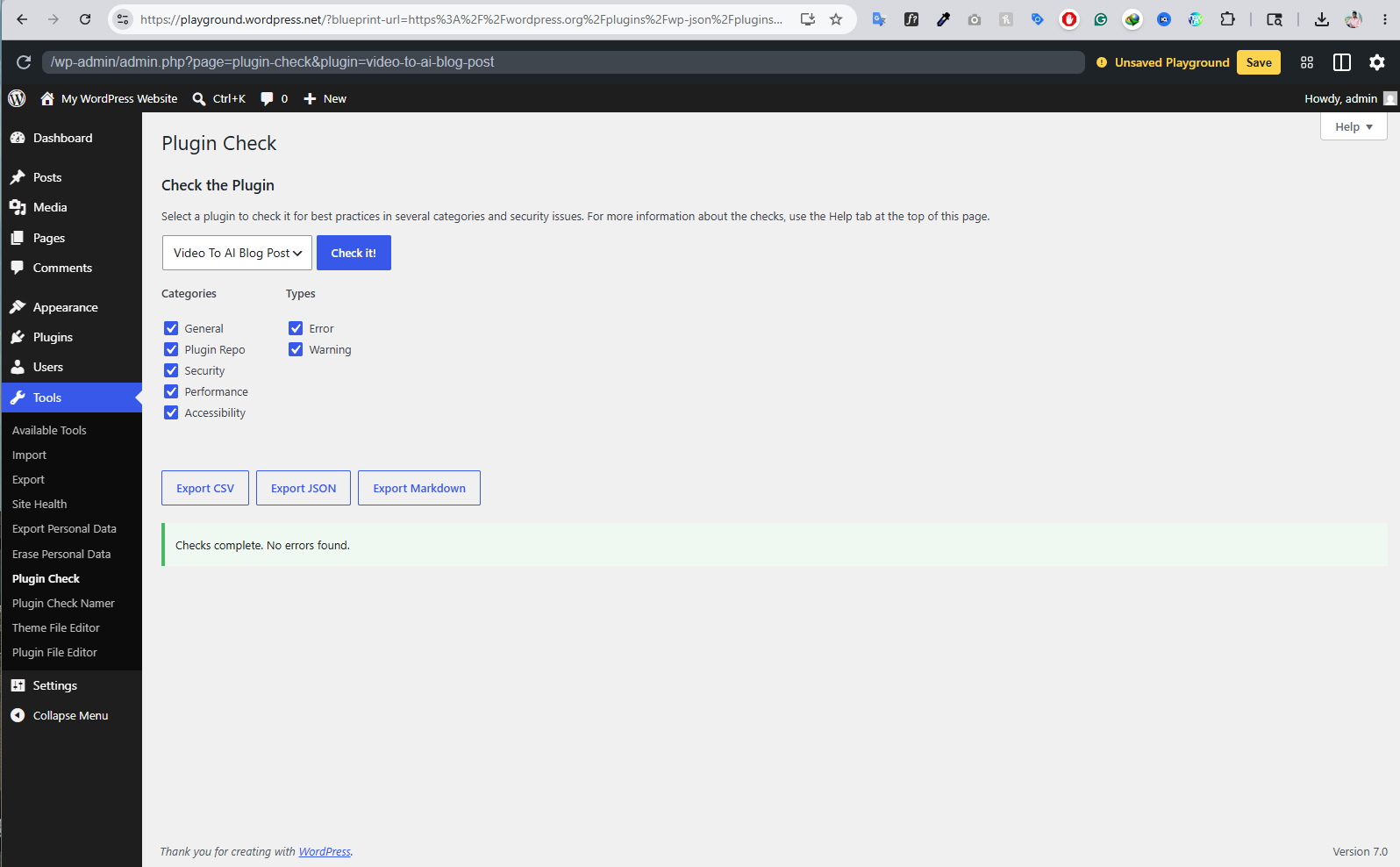
Zero errors. Zero warnings.
Tested with the official WordPress Plugin Check tool — the same automated quality scanner the WordPress.org review team uses to vet every plugin before approving it for the directory.
The check runs over 70 individual tests covering security vulnerabilities, performance, code quality, internationalization, accessibility, and compliance with current WordPress coding standards. Video To AI Blog Post passes all of them with a perfectly clean result — not a single error, not a single warning.
Built safe. Verifiably so.
Video To AI Blog Post is engineered around one principle: nothing leaves your server except direct calls to the official APIs you've authorized. There is no middleman, no proxy, no telemetry, no phone-home.
- Your credentials stay on your server.
API keys and OAuth tokens are stored exclusively in your WordPress database. The plugin author never sees them. - Direct API calls only.
Every request goes straight from your server to YouTube, Google, or OpenAI. No third-party server in the path. - GPL v2 open source.
Every line of code is auditable. You can read it, modify it, and verify what it does. - You control the Google project.
OAuth credentials are created in your own Google Cloud account. Revoke access in one click anytime. - WordPress security best practices.
Nonce verification, capability checks, sanitized inputs, and escaped outputs throughout — built to WP coding standards. - No data collection.
The plugin doesn't track usage, analytics, or any user behavior. There's nothing to opt out of because nothing is collected.
Almost free. Here's the math.
No subscriptions. No upsells. Just the actual costs of the underlying APIs — most of which are free.
I build this stuff for a living.
If you want a custom version of this plugin, a different automation, or a full WordPress build — I'm a government-verified freelancer with 10+ years of experience. Hire me directly:
Built for creators who hate busywork.
If you're publishing on YouTube and ignoring your blog, this is the missing link.
Podcasters
Long-form podcast episodes become searchable text instantly — every guest mention, every topic, indexable on Google.
News & commentary channels
Breaking news videos get blog versions in minutes. Capture the SEO window while the topic is still hot.
Tutorial creators
"How to" videos rank twice — once on YouTube, once on your blog. Both feed the same audience.
Course creators & educators
Lecture transcripts become written companions for students who prefer reading or need to search lessons.
B2B & thought-leadership channels
LinkedIn-style executives get a content library on their company blog without hiring a writer.
Reviewers & gaming creators
Product reviews and game commentary become long-tail SEO assets — people search reviews on Google, not YouTube.
Questions answered.
Yes. The plugin itself is 100% free and GPL-licensed. The YouTube Data API has a generous free tier (10,000 units per day). OpenAI charges only about $0.01–$0.03 per blog summary, so a channel uploading one video a day costs roughly $0.30–$0.90 per month.
It fetches the actual video transcript through the YouTube Data API v3 using your own OAuth credentials, then sends that transcript to OpenAI's ChatGPT API to produce a content-accurate summary. Because the AI works from the real transcript, the summary reflects what the video actually says — not what the title implies.
Yes — a free Google Cloud project with YouTube Data API v3 enabled and OAuth 2.0 credentials. The plugin includes a built-in step-by-step setup guide that walks you through every screen of the Google Cloud Console. Most users finish setup in under 10 minutes.
No. The default mode is "New Only" — it only processes videos published after activation. You can optionally switch to "From Date" to include videos from a specific date, or "All Videos" to backfill your entire channel history.
The YouTube Captions API requires owner-level access to download transcripts directly. For channels you don't own, the plugin falls back to scraping public captions or using the video description as input for the AI summary.
All API credentials live in your own WordPress database. Every API call goes directly from your server to YouTube, Google, or OpenAI. Nothing is sent to the plugin author's servers — there is no middleman, no telemetry, no analytics collection.
Yes. The post template is fully editable with placeholders for the video title, embed, thumbnail, and AI summary. You can rearrange them, add custom HTML, or wrap them in your theme's classes. The AI prompt is also fully customizable so the summary matches your brand voice.
The plugin falls back gracefully. It will attempt to use the video description as input for the AI summary. If that's also missing, the post is created with the embed and thumbnail but without a generated summary — you can add one manually later.
Yes. The plugin works on standard WordPress installs and on Multisite networks. Each site configures its own YouTube channel and API credentials independently.
Yes. There's a master on/off switch in the settings. Toggle it off, the cron stops running, and nothing new gets published until you toggle it back on.
Message me directly.
Bug report, feature request, support question, or just want to say something — I read every message. No support ticket system, no AI chatbot. Just me.
Ready to put your videos to work?
Install Video To AI Blog Post and never write another video recap from scratch.
From zero to auto-publishing — in 10 minutes.
The plugin ships with a built-in setup wizard, but if you want to know exactly what you're getting into before downloading, here's every step laid out in full. Read this once and you'll be set up faster than the wizard takes to load.
Get your YouTube Channel ID
Before anything else, the plugin needs to know which channel to watch. A Channel ID is a unique string that starts with UC followed by 22 characters. It's not the same as your channel handle.
youtube.com/channel/UCxxxxxxxxxxxxxxxxxxxxxx, the part after /channel/ is your Channel ID. Copy it.
youtube.com/@yourname — you need one more step. Click "Customize channel" from your channel page, then go to Settings → Advanced settings. Your Channel ID is listed there.
- Alternative method: right-click anywhere on your channel page → View page source → press Ctrl+F (Cmd+F on Mac) → search for
channelId. The first match is your ID.
https://www.youtube.com/feeds/videos.xml?channel_id=YOUR_ID in your browser, replacing YOUR_ID with your Channel ID. If you see an XML feed listing your videos, the ID is correct.
Set up your Google Cloud project & API Key
The plugin needs YouTube Data API v3 access to fetch video metadata and transcripts. This runs on Google's free tier — 10,000 units per day, which is more than enough for any normal channel. You only do this once.
Create the OAuth Client ID
The API Key alone can read public data, but pulling actual video transcripts requires OAuth — a secure login flow where you grant your own WordPress site read-only access to your captions. This is what makes the AI summaries accurate to what your video actually says.
YOUR-SITE.com with your actual WordPress domain):
Connect your YouTube account
This is the moment everything comes together. One click and the plugin is linked to your channel — read-only, revocable anytime, no third party in the chain.
Add your OpenAI ChatGPT API key
The last piece. This is what turns raw transcripts into clean, readable blog summaries written in natural language. OpenAI charges roughly 2 cents per summary, so a daily channel pays under a dollar a month.
sk-. Copy it immediately. If you lose it, you'll have to generate a new one (the old one stays valid but you can't see it again).
You've read the whole guide.
Now you know exactly what you're getting and how it works. Install the plugin — every step above is also built into the settings page as a clickable wizard.